
DBSCAN, OPTICS, and HDBSCAN: Finding Groups by Crowding
Published:
Look at a map of people in a park. A crowd may form a circle, a long queue, or a loose gathering. You can often recognize these groups without knowing how many there are: people inside a group have many neighbors, while gaps separate one group from another.
DBSCAN, OPTICS, and HDBSCAN use this idea of local crowding. They can find groups with irregular shapes and leave some points unassigned. Their main difference is how they decide what counts as crowded.
Updated October 19, 2026. No equations or coding experience needed.
| Method | The main idea | The result |
|---|---|---|
| DBSCAN | Look for enough neighbors within a chosen distance. | Groups and unassigned points. |
| OPTICS | Record how points connect across a range of density levels. | A plot from which groups can be selected. |
| HDBSCAN | Follow groups through changing density levels and select persistent ones. | Selected groups and unassigned points. |
DBSCAN: count neighbors, then connect crowded regions
DBSCAN starts with two settings:
eps: how far to look around each point.min_samples: how many points must lie within that distance for the neighborhood to count as dense. In scikit-learn, this count includes the point itself.
For example, set eps to 2 meters and min_samples to 5. A person counts as a core point if at least five people, including that person, lie within 2 meters.
The algorithm connects neighboring core points into a group. It also includes nearby border points: people who are close to a core point but do not have enough neighbors to be core points themselves. A border point joins a group without extending the search through its own neighbors. Points outside these groups are labeled noise. Here, noise means “not assigned at these settings,” not “bad data.”
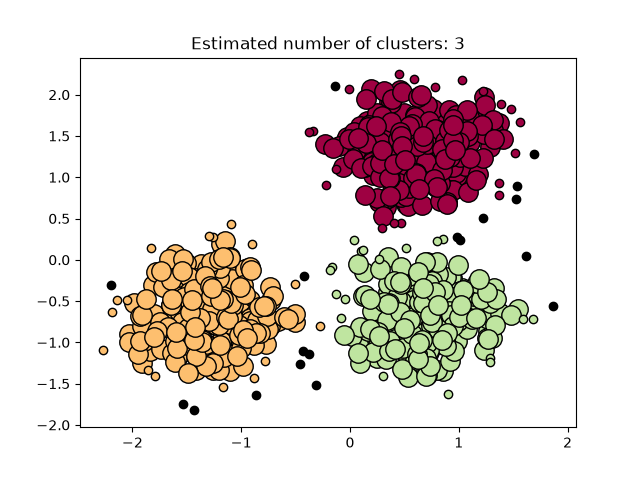
The main difficulty is choosing one distance for the whole dataset. A small eps can break a loose crowd into fragments. A large value can connect neighboring crowds. This matters when a dataset contains both tightly packed and widely spread groups. See the DBSCAN guide for the precise definitions.
OPTICS: make a plot of the density structure
OPTICS explores the points in an order that tends to keep densely connected regions together. For each point, it records a reachability distance: a distance that accounts for both the gap to an already visited core point and the crowding around that core point.
Small values mean a point can be reached through a dense neighborhood without a large gap. Plot these values in the order OPTICS visits the points, and groups often appear as valleys.
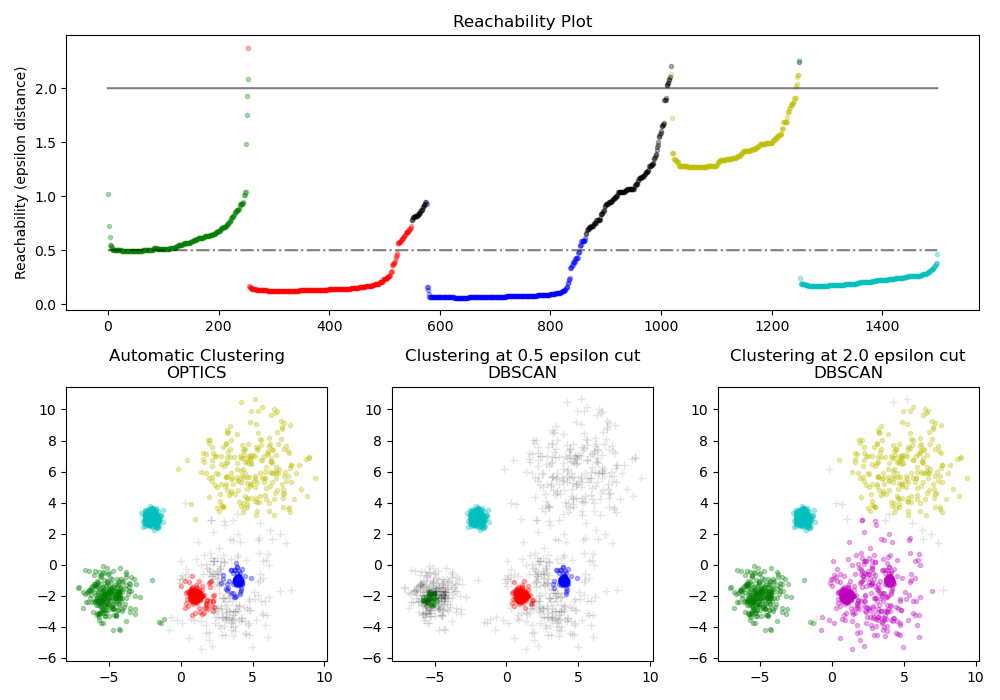
Here is how to read the figure:
- Top: each position along the horizontal axis is a point in the OPTICS ordering, not its position on the original map. Low stretches indicate dense connections. High values often occur at gaps or transitions.
- Bottom middle: the smaller distance cut finds the tight groups but misses much of the loose green and yellow groups.
- Bottom right: a larger cut recovers those loose groups but merges some nearby groups into the purple one.
- Bottom left: the illustrated OPTICS extraction keeps several groups with different densities separate.
OPTICS separates the description of the density structure from the choice of final groups. You can extract groups using a distance cut or by detecting steep changes around valleys. It still needs settings: min_samples controls local density, max_eps limits the search distance, and xi controls the required relative steepness when using that extraction method. Different settings can change the answer. This example is an illustration, not a guarantee that OPTICS always finds the intended groups.
HDBSCAN: keep groups that persist
Imagine gradually making the crowding requirement stricter. A large group may split into smaller groups, and scattered points may drop away. HDBSCAN records these changes as a tree of nested groups.
Before building the tree, it adjusts distances using local crowding. This reduces the ability of sparse points to form accidental bridges between dense groups. It then removes branches that are too small and selects clusters using a measure of stability. In the usual selection method, stability considers both how long a group persists across density levels and how many points remain in it.
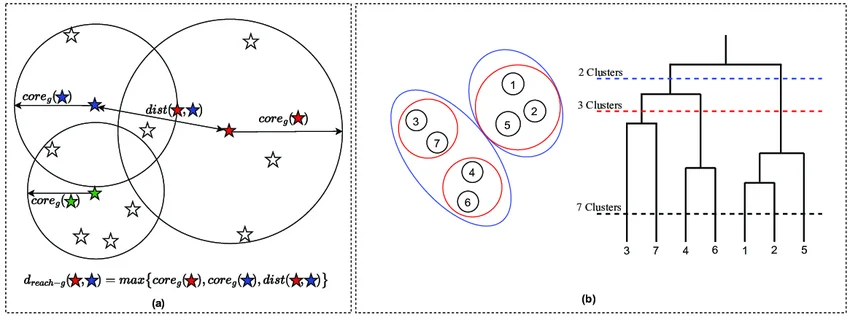
HDBSCAN does not require one global eps, but it still requires decisions. min_cluster_size sets the smallest group you want to retain. min_samples controls how conservatively the algorithm treats local density; increasing it generally leaves more points unassigned. Neither setting supplies the number of groups.
The HDBSCAN explanation describes the tree and stability calculation. The parameter reference explains the scikit-learn implementation.
Choosing a method for real data
Start with DBSCAN when one neighborhood distance has a useful meaning. Use OPTICS when you want to inspect structure across several density levels. Consider HDBSCAN when group densities differ and you want the algorithm to select groups from a hierarchy.
All three depend on what “nearby” means. A dataset containing distance in meters and time in seconds needs a deliberate choice of units, scaling, and distance measure. Otherwise, changing the units alone can change the groups.
This is especially important for galaxies. Redshift helps estimate distance, but a galaxy’s own motion also changes its redshift. A galaxy group can therefore appear stretched along our line of sight. In my sOPTICS work, I adjust the distance measure to account for this effect before applying OPTICS. A group of nearby points is a candidate physical system; simulations or other observations are needed to test that interpretation.
For any dataset, vary the settings, inspect which memberships change, and check whether the groups answer your actual question. If overlapping clouds and membership probabilities are more useful, read the companion post on Gaussian mixture models.